.svg)

.svg)


Testing
Mastering release testing: strategies and best practices



Automated testing to validate user experiences across real devices, networks, and channels.


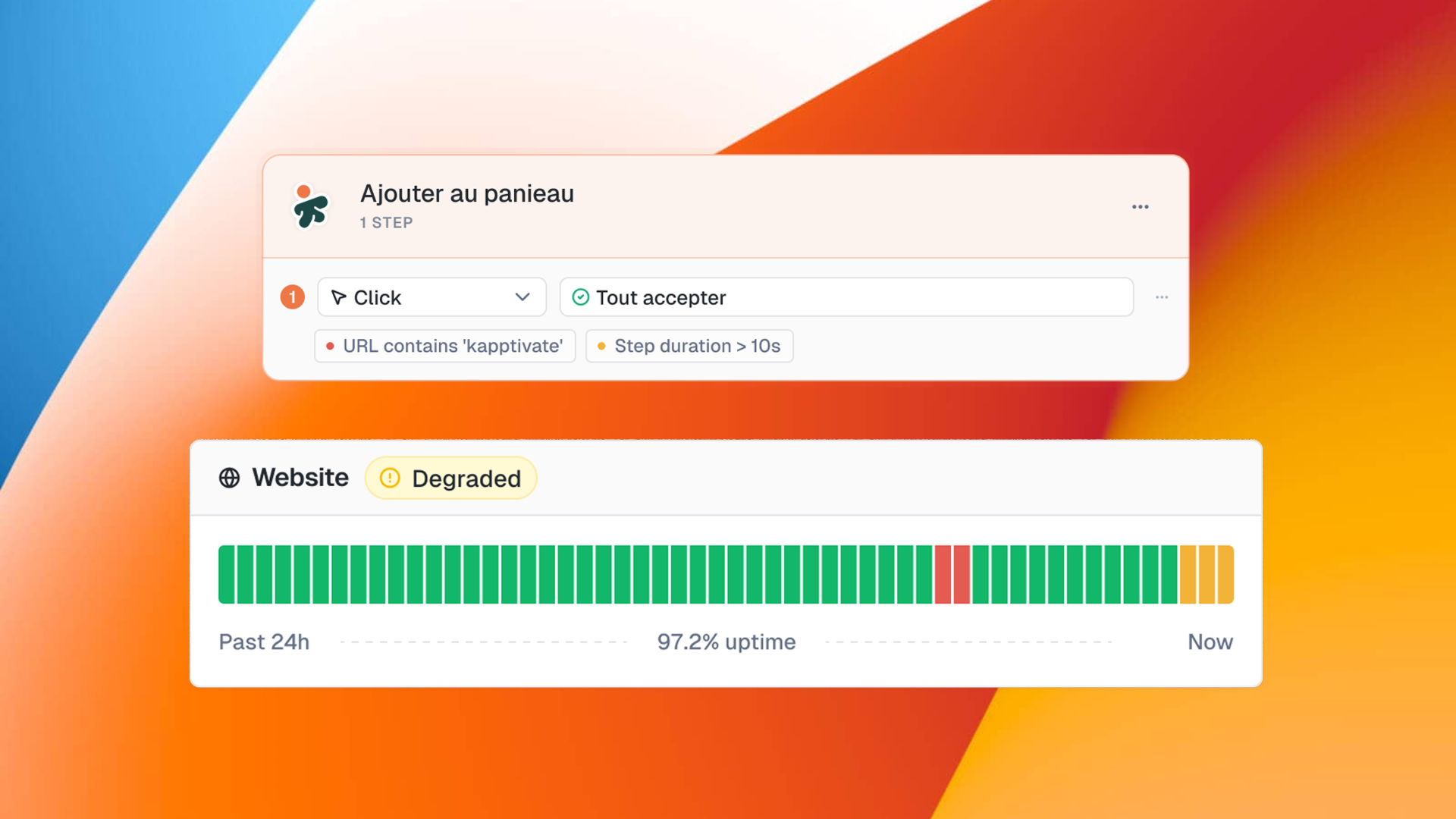
A synthetic test that turns green does not prove that every step did its job. When the verdict stays binary, a slow page raises the same alarm as a real outage: according to PagerDuty (2023), 22% of on-call time goes to non-actionable alerts. Warning and Failed thresholds set per step shrink that ratio, without rewriting a single existing test.
Summary
1.
What is step-level validation of a synthetic test journey?
2.
The hidden cost and the measurable gain
3.
What gains should you measure?
4.
Trade-offs and conditions for success
5.
FAQ
6.
Calculate your business case
7.
8
9.
10.
Step-level validation of a synthetic test journey means setting specific success conditions on each action in the journey, instead of one binary, end-to-end verdict. On a five-step checkout funnel, every step carries its own threshold: the redirect must land on a URL containing '/confirmation', and payment processing must stay under five seconds. Two response levels are configurable: Warning, which flags a degradation without triggering an incident escalation, and Failed, which marks a confirmed outage.
This breakdown stops a passing slowdown from raising the same alarm as a genuine service interruption. For an on-call team, the benefit is direct: separating what demands an immediate response at 3 a.m. from what can be scheduled during business hours. At Kapptivate, these conditions sit on a journey assembled through no-code web journey test creation, without altering the existing test in any way.

Without step-level validation, a synthetic test answers a single question: did the journey pass or fail? This binary logic creates two expensive problems.
First, false positives: a page that loads in eight seconds instead of two raises the same alert as an unreachable page, waking the on-call engineer for an incident that does not warrant escalation.
Second, blind spots: a journey that passes overall can mask a gradual degradation on one specific step. According to PagerDuty (2023), 22% of on-call time goes to non-actionable alerts.
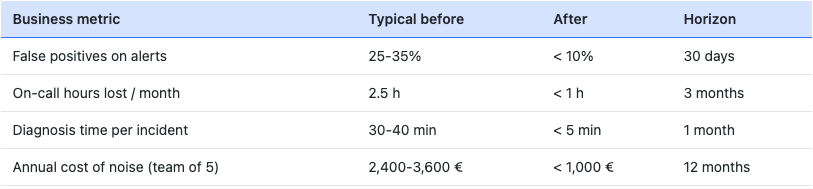
For a team of five engineers handling 40 alerts per month, a quarter of them false positives, that adds up to nearly 2.5 hours lost every month. At 80 to 120 euros per hour in EMEA, the annual bill for this noise lands between 2,400 and 3,600 euros, for a single team.
One e-commerce team spotted a six-week slow degradation on its checkout funnel thanks to the 12-month execution history, before it became an outage visible to customers.

Four indicators quantify the return on investment of step-level validation.
The first is the false-positive rate: a team that separates Warning, in yellow, from Failed, in red, mechanically cuts down on needless escalations.
The second is mean time to acknowledge: a schedulable Warning triggers no emergency response and protects the team's rest periods.
The third is diagnostic coverage: the execution report pinpoints the exact step at fault, its duration, the screenshot, and the replay video, saving between 20 and 40 minutes of log digging per incident.
The fourth is early detection: a 12-month history lets you correlate a slow degradation with an infrastructure change that happened several weeks earlier, before customers ever notice.
Measure these four indicators across 30 days before and after activation to put a real number on the gain, and compare them against your sector baseline for context.
Step-level validation only creates value when thresholds are anchored in a real baseline.
Turning on checks with arbitrary values reproduces the very noise you set out to remove: collect two to four weeks of executions, compute the 75th and 95th percentile of duration for each critical step, then set Warning just above the first and Failed above the second.
Second condition, align your internal processes: a Warning with no scheduled handling path simply becomes an ignored Failed.
Finally, URL and duration checks cover roughly 80% of standard journeys; for assertions on a page's dynamic content or an API payload, you need to combine them with automated web testing. Worth noting: tests already in production receive no checks at migration, so there are no unwanted alerts on activation day.
Do checks apply to existing tests automatically? No. Tests already in production receive no checks at rollout, which rules out any risk of unwanted alerts after migration.
Can you combine several conditions on the same step? Yes. Conditions assemble with AND/OR logic, for example checking that the URL contains '/confirmation' and that the step duration stays under five seconds.
Does step-level validation work on mobile and API tests? URL and duration checks target web journeys first. For mobile and API, Kapptivate validates other dimensions (response codes, data assertions, call duration) within its synthetic multi-channel scenarios.
Calculating alert noise comes down to three variables: the number of monthly alerts on your synthetic tests, your estimated share of false positives (sector baseline: 25 to 35%), and the hourly cost of an on-call engineer (80 to 120 euros).
The formula: alerts per month × false-positive share × 0.5 hour × hourly cost = monthly cost to eliminate. For a team of five, 40 alerts, 30% false positives, and 90 euros per hour, that gives 12 alerts × 0.5 h × 90 € = 540 euros per month, or 6,480 euros per year.
Turn on Step-level Checks for your noisiest journey and measure the noise reduction over 30 days.